

Business Operations
Corporate Travel Management
A connected customer portal and internal operations dashboard for a corporate travel service. Client companies submit and track travel requests; the travel team triages, routes for approval, prepares fare options, assists with visas and reports on activity — all from one shared record.
- Status
- Interactive prototype
- Updated
- October 2026
- Data
- Fictional, browser-only
- Built by
- Nityo Infotech Indonesia
The short version
Watch the workflow before you open it.
Recorded from the running prototype — every screen in the film is one you can click through yourself.
01 · The problem
Travel requests live in inboxes, spreadsheets and phone calls.
Corporate travel teams typically juggle requests arriving by email and chat, approvals that stall in someone's inbox, and visa paperwork tracked in separate files. Clients ask for status updates because they cannot see progress for themselves.
The result is duplicated effort on both sides: travel coordinators chase updates, and the operations team spends time answering them instead of moving requests forward.
02 · Use cases
Where a travel desk like this earns its keep
Any team that books travel on behalf of other people — and spends its day answering “any update?” — can run on this pattern.
- 01Travel management company serving corporate accounts
- Who
- A TMC with several corporate clients and a small operations team.
- The situation
- Requests arrive by email and WhatsApp; consultants re-key them, chase approvals by phone and send fare options as screenshots.
- What changes
- Clients raise and track trips in their own portal. Consultants work one queue with owners, statuses and a shared timeline instead of an inbox.
- 02In-house travel desk at a large company
- Who
- An internal team booking for hundreds of staff across sites.
- The situation
- Every trip needs a manager’s approval and a cost centre, and finance can’t see spend until invoices arrive.
- What changes
- The policy is checked as the request is typed, approvals are recorded against the trip, and spend by account is visible as bookings happen.
- 03Project mobilisation and site rotations
- Who
- Mining, energy or construction firms moving crews to remote sites.
- The situation
- Rotations change at short notice and visas, flights and transfers are tracked in spreadsheets.
- What changes
- Each traveller’s trip, visa stage and documents sit in one place, and the ops team sees departures due within seven days.
- 04Events and incentive trips
- Who
- Agencies running group trips, conferences or reward travel.
- The situation
- Dozens of travellers, each with their own preferences, documents and changes.
- What changes
- Every traveller is a tracked request with its own timeline, while the organiser sees the whole group’s status at a glance.
Fits
- Travel management companies
- Corporate travel and admin teams
- Government and NGO travel units
- Event and MICE agencies
Extends to
- Hotel and ground-transport booking
- Duty-of-care alerts for travellers abroad
- Expense claims after the trip
- Supplier rate and contract management
A production build connects to
- A GDS or airline/hotel booking APIs
- WhatsApp and email messaging
- Single sign-on for client staff
- Finance or ERP for invoicing
03 · Proposed approach
One request record, two purpose-built interfaces.
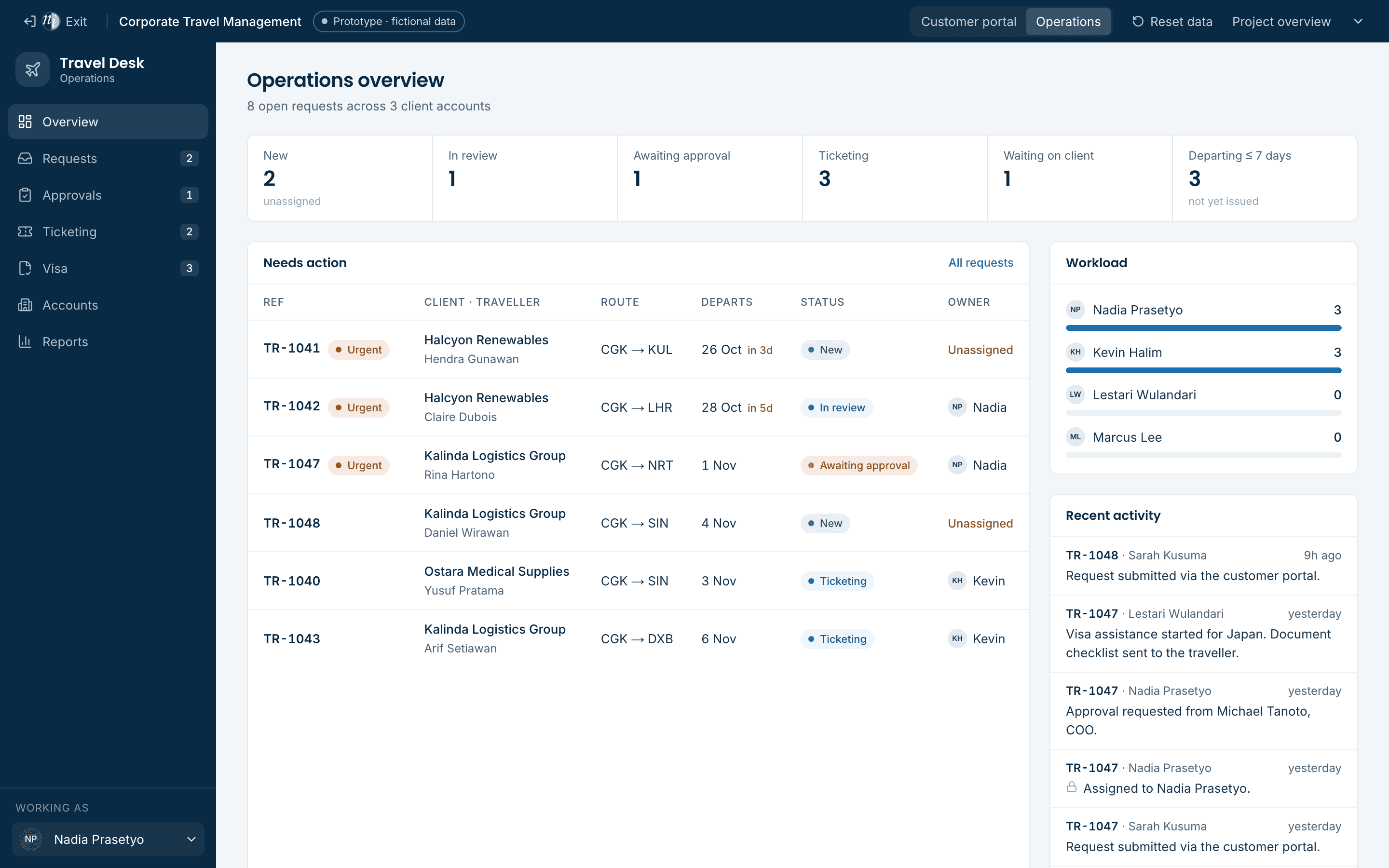
The concept explores a customer portal for client companies and an operations dashboard for the travel team, both working from the same request record. A request submitted by a client appears immediately in the operations queue, and every status change made by the team is reflected back to the client.
Each interface is designed for its audience. The portal is quiet and service-oriented, focused on reassurance and clear next steps. The dashboard is dense and efficient, built around queues, assignment and fast status changes.
04 · Functional highlights
What you can try in the prototype
- Guided request submission
- Clients describe the trip, traveller, preferences and cost centre. Policy hints flag when approval will be required.
- Shared status model
- Submitted, in review, awaiting approval, ticketing, issued and completed — the same states drive both interfaces.
- Assignment and internal notes
- Operations agents claim or assign requests and keep internal notes that never appear in the client portal.
- Approval workflow
- Requests outside policy are routed for approval; decisions are recorded on the timeline with the approver's name.
- Fare options, not fake bookings
- Agents prepare fare options and share them with the client. Issuance is explicitly simulated — no airline is contacted.
- Visa assistance checklist
- Visa cases track required documents as a checklist. The prototype never asks for or stores real passport data.
05 · Interface previews
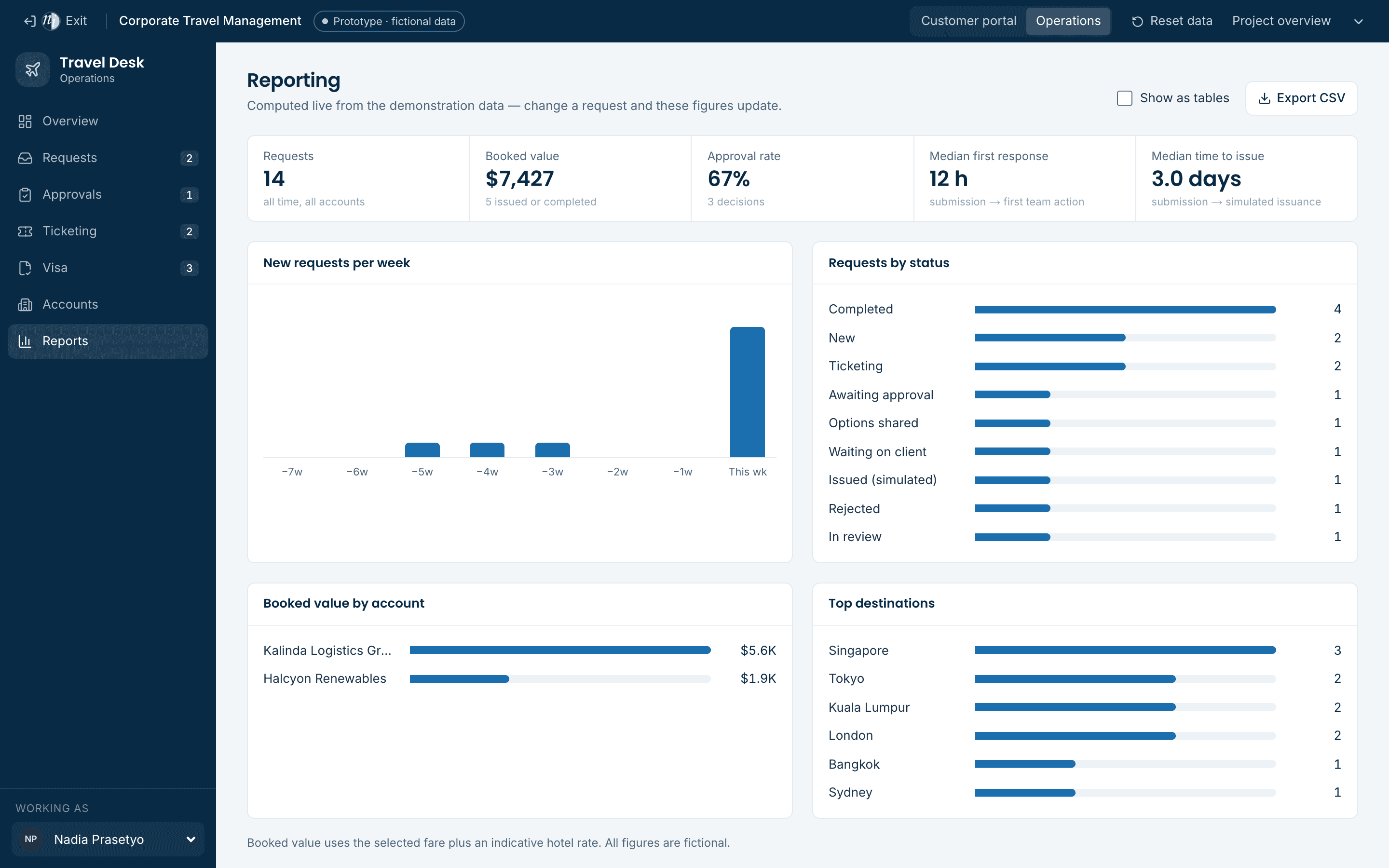
Captured from the running prototype
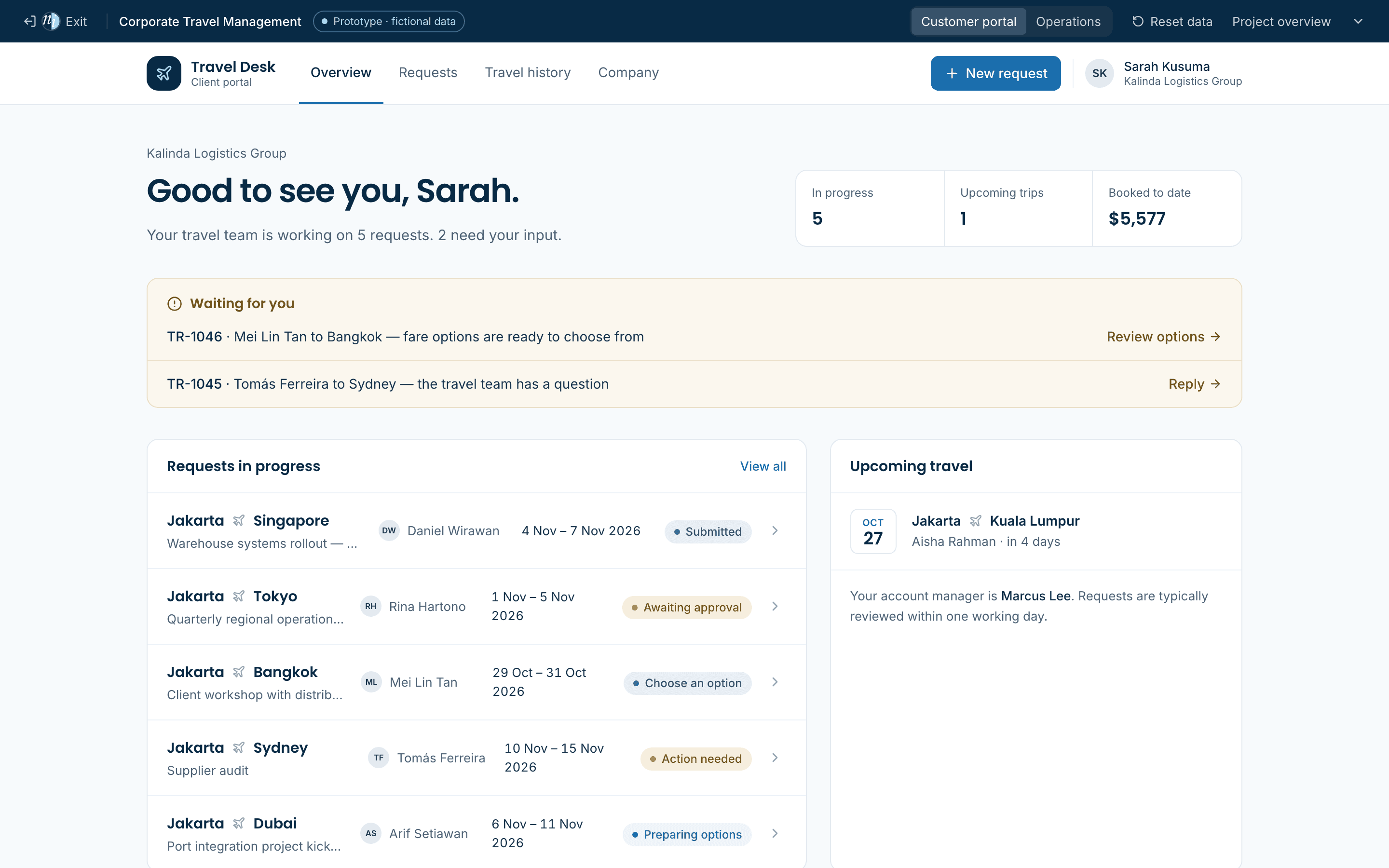
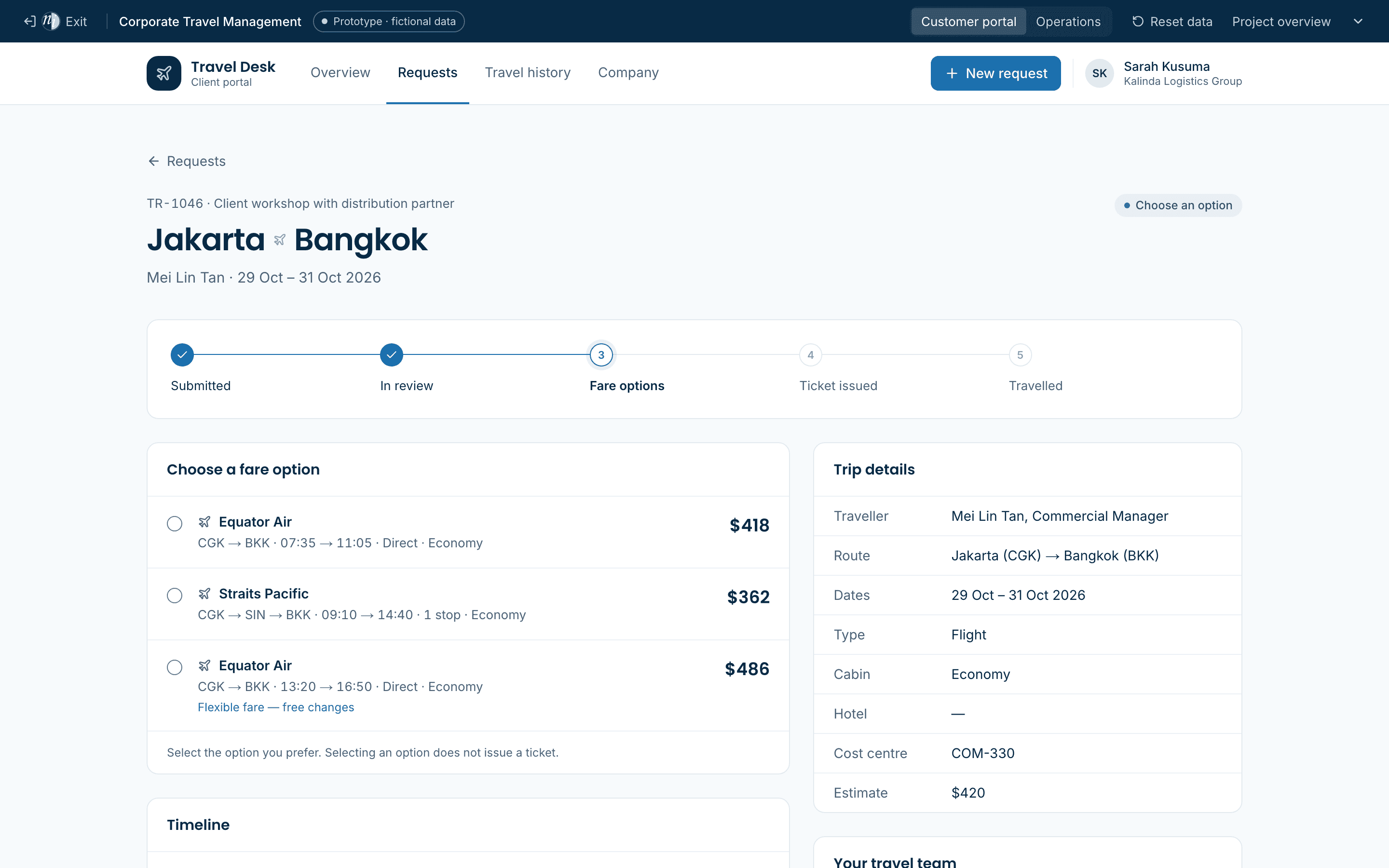
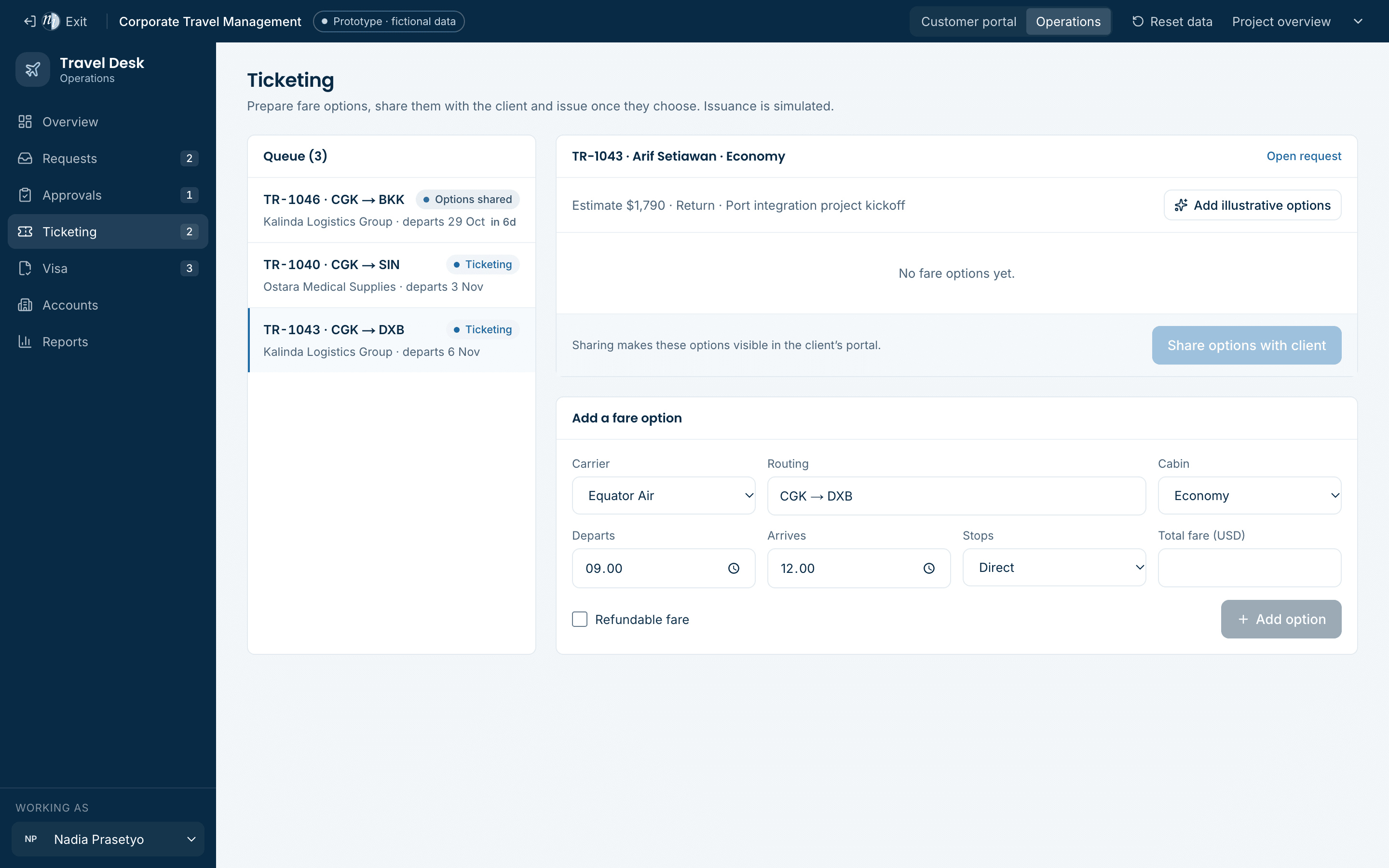
06 · Simulated versus live
What the demo simulates, and what a build would connect
The prototype is honest about its boundaries. Production integrations are agreed during discovery.
| Capability | In the concept demo | In a production build |
|---|---|---|
| Corporate booking | Fictional carriers and fares | SAP Concur and the current GDS |
| Visa lodgement | Checklist and stage changed by hand | Tracked and lodged on official portals |
| Client messaging | In-app timeline only | Qontak (WhatsApp and email) |
| Document storage | Nothing collected | Encrypted cloud storage with retention rules |
| Sign-in | Demo personas | Company SSO |
| Invoicing and spend | Sample figures | Client ERP and finance export |
07 · Prototype limitations
What this demonstration is — and is not
This is a concept demonstration built to explore workflows and interface design. Production requirements, integrations and security would be established during discovery.
- All companies, travellers, staff and requests are fictional.
- Data is stored in this browser only (localStorage). It is not shared between devices or users, and it is not secure storage.
- There is no airline, hotel, GDS, expense or CRM integration. Fare options are illustrative and issuance is simulated.
- There is no authentication; the portal and dashboard are opened directly for demonstration.
- No passport documents, payment details or personal data are collected.
Try it
Open it and walk through the workflow.
- 1Open the customer portal and create a new travel request.
- 2Switch to the operations dashboard — the request is waiting in the queue.
- 3Assign it, move it through approval, then prepare fare options in Ticketing.
- 4Return to the portal: the status has moved on and the client can choose an option.
- 5Use “Reset data” in the demo bar to start again before the next meeting.