

Insurance
Insurance Claims: Report to Settlement
Customers report a claim in four short steps — tapping damaged panels on a car diagram — and follow it to payment. Claims handlers work a queue ranked by explainable fraud signals, request information, approve with deductibles and release payment.
- Status
- Interactive prototype
- Updated
- October 2026
- Data
- Fictional, browser-only
- Built by
- Nityo Infotech Indonesia
The short version
Watch the workflow before you open it.
Recorded from the running prototype — every screen in the film is one you can click through yourself.
01 · The problem
Claims are where customers decide whether to stay.
Reporting a claim usually means a phone call, a long form and then silence. Handlers, meanwhile, open every file the same way and spot suspicious claims late.
The prototype makes reporting quick and visual for the customer, and gives handlers a queue ordered by risk — with every point of the score traceable to a named rule.
02 · Use cases
Faster, fairer claims — for customers and handlers
Use it wherever claims arrive through a call centre or long forms and every file is handled the same way regardless of risk.
- 01Motor first notice of loss
- Who
- Policyholders reporting a car accident, theft or flood.
- The situation
- Reporting means a long call, and the customer then hears nothing for days.
- What changes
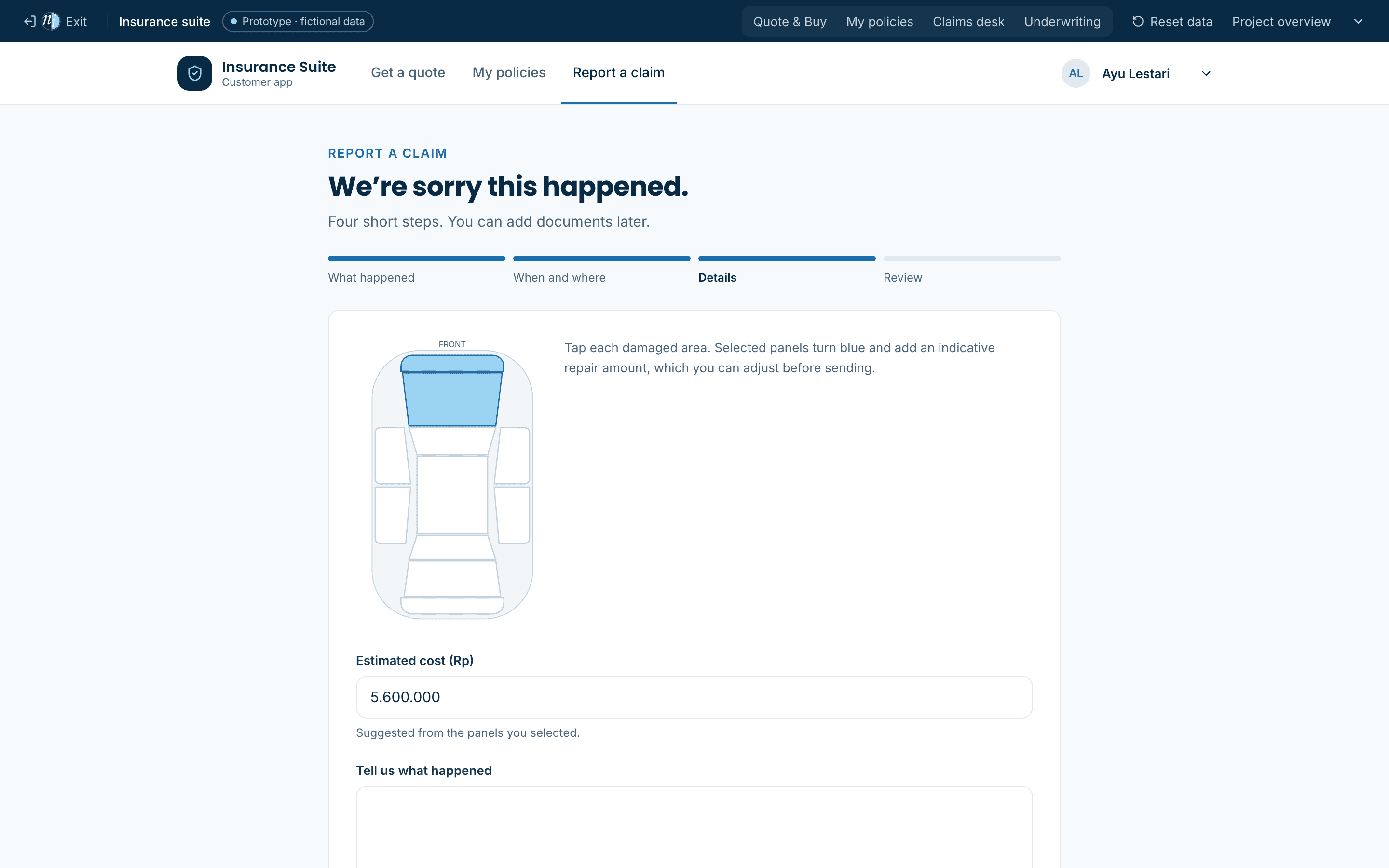
- They report in four steps with a tap-to-mark car diagram, and follow every status change on a tracker.
- 02Fraud-aware claims triage
- Who
- Claims teams with mixed simple and suspicious claims.
- The situation
- Every claim is opened in the order it arrived; red flags are spotted late, if at all.
- What changes
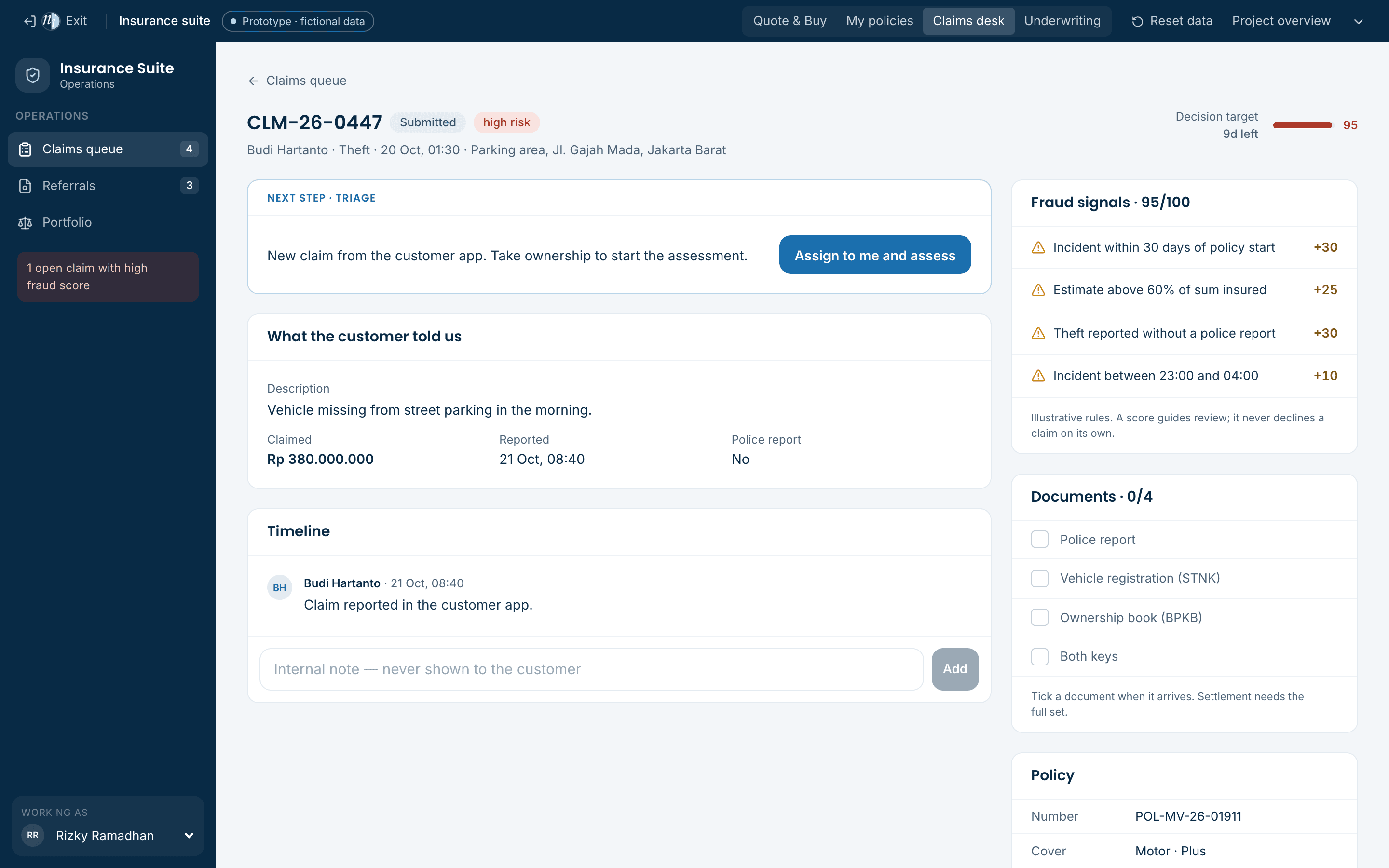
- The queue is ranked by an explainable fraud score, and each point traces to a named rule a handler can check or challenge.
- 03Handler authority and documents
- Who
- Claims managers responsible for controls and audit.
- The situation
- Approvals above a handler’s limit and missing documents are caught in audits, not at the time.
- What changes
- Approval stays locked until the document set is complete, and anything above the handler’s authority needs a recorded sign-off.
- 04Health and SME claims
- Who
- Customers claiming hospital bills or property damage.
- The situation
- Paper receipts, repeated requests for the same documents and no visibility of progress.
- What changes
- The required documents are listed per claim type, requests go straight to the customer’s app, and the 14-day target is visible to the team.
Fits
- Motor, health and property insurers
- Third-party claims administrators
- Fleet and corporate policies
- Takaful operators
Extends to
- Partner workshop and hospital networks
- Photo and video evidence upload
- Surveyor assignment
- Recovery and salvage tracking
A production build connects to
- The claims and policy systems
- Payment and disbursement
- Fraud data services
- WhatsApp and email notifications
03 · Functional highlights
What you can try
- Damage diagram
- Tap panels on a car outline; an indicative repair amount is suggested and can be adjusted.
- Explainable fraud score
- Early-policy incidents, high amounts, late reporting, night-time theft without a police report — each adds visible points.
- Two-way requests
- Handlers ask for information; the customer replies in the app and the claim returns to assessment.
- Settlement with deductibles
- Approvals apply the own-risk deductible automatically before payment is released.
04 · Interface previews
Captured from the running prototype
05 · Simulated versus live
What the demo simulates, and what a build would connect
| Capability | In the concept demo | In a production build |
|---|---|---|
| Photos and documents | Not collected | Secure upload with image analysis |
| Fraud detection | Six weighted rules | Rules plus models and industry databases |
| Workshop network | Named in the timeline only | Workshop booking and estimates |
| Payment | Simulated release | Bank transfer and payment reconciliation |
06 · Prototype limitations
What this demonstration is — and is not
- The insurer and every customer, policy and claim are fictional.
- Rates, rules and fraud weights are illustrative — not real tariffs or regulatory pricing.
- Data is stored in this browser only; no documents, medical or payment data are collected.
- No core policy system, payment gateway, workshop network or regulator portal is connected.
Try it
Open it and walk through the workflow.
- 1Report a collision claim and tap the damaged panels.
- 2Open the Claims desk — the claim is in the queue with its fraud score.
- 3Open CLM-26-0447 to see a high-risk theft and the rules behind its score.
- 4Assess your new claim, approve it and release payment; the customer sees each step.